Elevate Your Digital Listings with Multi-Device Mockups
In the world of selling digital products, the presentation is almost as crucial as the product itself. Whether you're offering planners, ebooks, workbooks, or printable art, the first impression a potential customer gets is from your listing images. A crisp, professional mockup that showcases your design on a device like a tablet or laptop can instantly communicate value and quality. For many sellers, however, creating these images from scratch is a daunting task, often requiring expensive software and a steep learning curve. This is where a solution like the 110 Multi Device Mockup Canva Templates becomes a practical game-changer for your workflow.
A Practical Toolkit for Modern Sellers
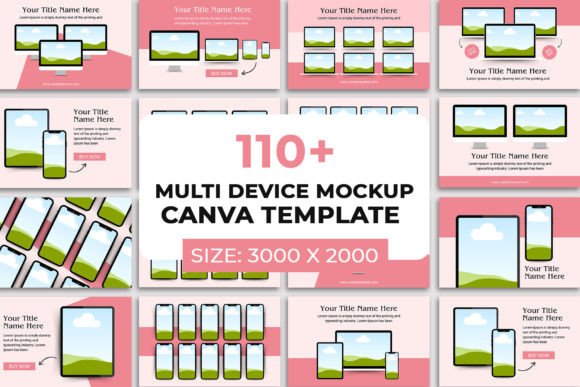
At its core, this collection is a set of pre-designed frames and scenes built specifically for Canva. The visual style leans towards clean, modern, and professional. Think of sleek device bezels—iPads, MacBooks, and iPhones—set against minimalist backgrounds or in lifestyle contexts. The personality is functional and versatile, designed to let your work be the star. The appeal lies in its straightforward utility; it’s not about flashy design trends, but about providing a consistent, polished stage for your digital products. The templates are sized at a generous 3000 x 2000 pixels, ensuring your images look sharp across Etsy, your own website, and social media platforms.
The real-world value of using such a structured system for your brand identity cannot be overstated. Consistency across your shop listings builds trust and recognition. When a customer sees your planner mockup on a iPad in one listing and your ebook on a MacBook in another, using the same shadow treatment and background style, it creates a cohesive visual language. This is a fundamental aspect of professional branding that often gets overlooked by small business owners juggling multiple roles. It transforms a chaotic collection of listings into a curated digital storefront.
Where This Approach Truly Shines
The applications for these multi-device mockups extend far beyond a simple Etsy shop. They are versatile design assets for anyone in the creative and commercial space. For a blogger or content creator, they are perfect for showcasing downloadable resources like lead magnets or digital guides on your website. Publishers can use them to create compelling author pages or book launch graphics. Social media managers find them invaluable for creating scroll-stopping posts that demonstrate a digital product in use, which can significantly boost engagement and click-through rates.
Consider the practical benefits for your daily operations. The process is intentionally simple: drag and drop your JPG or PNG design into the frame. Features like an editable drop shadow allow you to adjust lighting to match your brand’s aesthetic. This saves a tremendous amount of time and energy, freeing you to focus on creation rather than presentation. Because it’s 100% editable with a free Canva account, the barrier to entry is incredibly low. You can change text, colors, and backgrounds to align perfectly with your existing brand guidelines, ensuring every piece of marketing material feels intentionally crafted.
Making the Most of Your Mockup Templates
Choosing the right template from the set is your first step. Look for device compositions that complement the aspect ratio of your digital product. A vertical planner looks best on an upright tablet, while a wide ebook might shine on a laptop screen. Don’t be afraid to mix and match elements from different templates within the collection to create a unique scene that feels tailored to your brand.
When evaluating project fit, think about your target audience. A clean, white-space-heavy mockup suits a minimalist planner brand, while a template with a cozy, textured background might be perfect for a knit pattern PDF. The key is alignment between the mockup’s environment and the product’s intended use or buyer persona. This is where you apply a designer’s eye to marketing strategy.
Testing is crucial. Before finalizing an image, view it at the size it will appear on a sales platform. Is the text on your design legible? Does the overall image hierarchy guide the eye to the most important part of your product? The professional appearance afforded by these templates can influence a viewer’s perception of your product’s quality, directly impacting conversion rates. Remember, the goal of the mockup is to make your customer visualize owning and using your digital product. By providing that clear, attractive vision, you bridge the gap between a file on a screen and a valuable tool in their hands.
In essence, leveraging a resource like the 110 Multi Device Mockup Canva Templates is about working smarter. It’s a practical investment in the presentation layer of your business, ensuring that the hard work you put into creating your digital products is matched by equally professional and compelling imagery. This consistency not only elevates your brand’s perception but also streamlines your creative process, allowing you to maintain a high standard across all your digital touchpoints with efficiency.